Model routing
AICoder drives the real claude and codex CLIs, so a session spends your subscription quota. Model routing is the main lever for keeping that cost down.
Defaults
| Work | Default model | Why |
|---|---|---|
| Coding | Sonnet | Best coding model at a reasonable cost |
| Reviews, judge, explain, Azure | Haiku | Cheap, ~90% of Sonnet's quality for aux work |
| Opus / Fable | Opt-in per task | Deepest reasoning, but far more expensive |
The CLI's own default model (often Opus) is overridden per job so you don't accidentally run everything on the priciest model.
Overriding per task
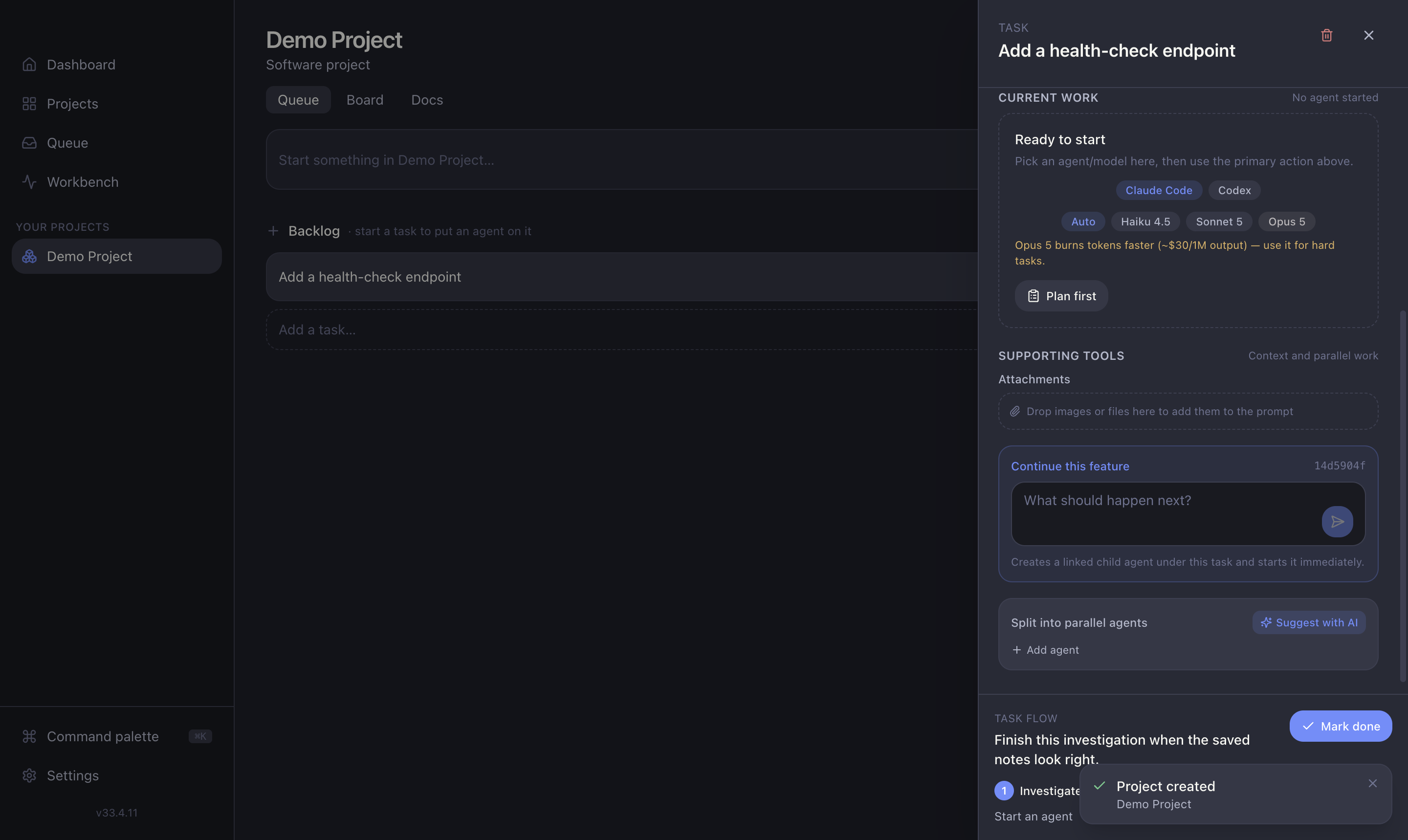
In the task drawer you can pick the model for a task:
- Auto — let AICoder route to the cheapest capable model.
- Haiku / Sonnet — fixed choice.
- Opus / Fable — opt-in; shows a warning before it runs.
The expensive-model warning
Choosing Opus or Fable pops a warning ("burns tokens faster…") and, on start, a toast confirming the choice. It's a deliberate speed-bump so cost is always a conscious decision, never an accident.
Configuring defaults
Set the default Claude and Codex models, and the auto-vs-manual routing mode, in Settings → AI models.
Why it matters
Running many parallel sessions multiplies cost fast. Keeping coding on Sonnet and everything auxiliary on Haiku is what makes heavy parallel use affordable.